Search This Blog

Monday, February 22, 2010

Encryption - For emails

How to send an encrypted emails?

Enkodr 1.0

JitBit Enkodr™ is the world's easiest "on-the-fly" text encryption software. It works in conjunction with ANY text-editing program: MS Word, MS Outlook or even a web-based email like GoogleMail or Yahoo.

  1. Just enter some text (in ANY program)
  2. Select the text with your mouse
  3. Press a keyboard shortcut
  4. Choose a password
  5. The text will change to a totally unreadable set of characters.

For More Details, Visit http://www.jitbit.com/enkodr.aspx

DOWNLOAD


Thursday, February 18, 2010

Aviary - Photoeditor Creation on the Fly


Photo-editinglogosweb templatesfilterscolor palettesscreen capture & more at Aviary.com


For more details, explore http://aviary.com/


SenderOK - Email Alerts Assistant

Email Popup tool

Boost Your Email Productivity

If you use email on a daily basis, SenderOK will soon become your favorite companion. See what you get with SenderOK:

  • Get a map of all unread Outlook & Webmail messages grouped by accounts
  • Have your incoming emails ranked and grouped under VIP, Important and Routine categories
  • Be notified about new priority mail even if your Outlook and webmail are closed
  • Have good mail rescued from the Spam folder
  • Get email with a human face: view photo business cards of email senders

DOWNLOAD

Tuesday, February 16, 2010

LISTART - Search as you type

what is Listary?

Listary is an excellent enhancement utility for list controls used everywhere: Windows Explorer, Task Manager, Registry Editor, and innumerable third-party applications

Autocomplete - Imagine that you have a folder containing some log files all named like "Program Log 01-XX-2010.log" (XX is the date), if you want to select "Program Log 01-05-2010.log", you just need to type four keys: p + Tab (autocomplete) + 0 + 5!

Wildcards - Listary supports wildcards like "*" and "?", so you can search in the current list handily. The search result will be shown in real time, much faster than the build in search feature of Windows.

For more details, visit http://www.listary.com/

DOWNLOAD

Saturday, February 13, 2010

Enable or Disable Google Buzz

Quite recently we gave you options to disable Google Buzz emails and Buzz update counts in Gmail. However. it turns out Google does provide a much more easier to disable Google Buzz completely for users who do not want to use it.

turn_off_google_buzz

If you are a user who has no use for Google Buzz, login to your Gmail account and scroll down to the bottom of the page. In the footer links you will see a link which says "turn off buzz".

Just click on that link and Google Buzz will disappear from your Gmail account forever. If you want to turn on Google Buzz again, scroll down to the bottom and click on the "turn on buzz" link.

Wednesday, February 10, 2010

Firefox address bar to search google

firefox_ [320x200].jpg

You need to tweak the Firefox about:config setting in order for you to perform a regular Google Search from the address bar in Firefox.

  1. In the Firefox’s address bar, type in about:config
  2. On the filter box, type keyword.URL
  3. Now, modify the string value and replace it with : http://www.google.com/search?btnG=Google+Search&q=
  4. Click OK and finish!

Firefox Open popups in new tabs

firefox_ [320x200].jpg

By default, all popups are opened in a new window. To open popups in new tabs, go to about:config and change the browser.link.open_newwindow.restriction to any of the following values:

  1. 0: Divert all new windows to current tab/window or new tab.
  2. 1: Don’t divert any windows spawned by JS
  3. 2(Default): Don’t divert JS windows that include size/placement/toolbar info

Thursday, February 4, 2010

Windows Vista - ndis.sys Blue Screen

Issue: ndis.sys Blue Screen, the blue screen shows, DRIVER_IRQL_NOT_LESS_OR_EQUAL

Solution: irq not less than is usually a driver issue, Update you Intel LAN card, WLAN and Video drivers to get this issue resolved.

Monday, February 1, 2010

Dell Laptops Shortcut Keys

Fn + Power (for 5 seconds) = Hardware Diagnostics Test

Tuesday, January 12, 2010

UID Project Details Leaked

Indian Government’s ambitious Unique ID project that will impart unique identity number to each and every resident will change the way social welfare systems are delivered to the mass.

The UID project does have its technology challenge and of course, privacy concerns. There are a few subtle information about UID project that are described as follows:

  • The UID number will only provide identity: The UID number will only guarantee identity, not rights, benefits or entitlements.
  • The UID will prove identity, not citizenship: All residents in the country can be issued a unique ID. The UID is proof of identity and does not confer citizenship.
  • Partnership Model : The UIDAI will be the regulatory authority managing a Central ID Data Repository (CIDR), which will issue UID numbers, update resident information, and authenticate the identity of residents as required. In addition, the Authority will partner with agencies such as central and state departments and private sector agencies who will be ‘Registrars’ for the UIDAI.
  • The UIDAI will issue a number, not a card.
  • UID number will not contain intelligence: Loading intelligence into identity numbers makes them susceptible to fraud and theft. The UID will be a random number.
  • Online authentication: The Authority will offer a strong form of online authentication, where agencies can compare demographic and biometric information of the resident with the record stored in the central database
  • UID will store basic information like Name/Date&Place of Birth/Gender/Father’s Name/Mother’s Name/Address/Expiry Date/Photograph and Finger Prints
  • The UIDAI will not share resident data: The agencies may store the information of residents they enrol if they are authorized to do so, but they will not have access to the information in the UID database. The UIDAI will answer requests to authenticate identity only through a ‘Yes’ or ‘No’ response.

Firefox Addons: MAILBROWSER for Gmail

MailBrowser is a free GmailPlugin that helps you easily manage your contacts and attachments

Features

For more details, visit http://mailbrowser.com/

DOWNLOAD

Firefor Addons: Goo.GL

Simple extension to let you use Goo.gl, Google's URL shortener.

After installation, right-click your Firefox toolbar, click "Customize", and drag the Goo.gl button to a toolbar.

Clicking it will make a goo.gl URL and copy it to your clipboard.

Add to Firefox http://goo.gl/BkMJ

Google Launches a Public DNS Service

Google Launches a Public DNS Service

If you’ve ever looked at a common web technology, protocol, service or piece of internet infrastructure and wondered aloud if Google was working on its own better, faster version of it, rest assured that the answer is almost always, “yes.”

The company announced Thursday that it is launching a public domain name system (DNS) service. On the Google Public DNS project’s website, Google tells us why DNS matters to everyone:

The company’s plan, in its words, is to make those lookups happen faster, more securely and without redirects.

To start using Google Public DNS, set your network controls for the heart of Google’s servers, which live at the very cool IP addresses 8.8.8.8 and 8.8.4.4.

For More Details, visit http://code.google.com/speed/public-dns/docs/using.html

Monday, January 4, 2010

Firefox: Launch Websites Easily in Firefox with Your Keyboard

After installing the extension it is recommended that you go into the settings first to make any desired changes or modifications. Here you can see the “Launcher Hotkey, Direct to Site Hotkey, & Default Shortcuts”. For more details, visit http://www.donesmart.com/sitelauncher/

DOWNLOAD

Friday, January 1, 2010

Windows Vista or Windows 7 - How to remove the profile?

Error message when you log on to a Windows Vista-based or Windows 7-based computer by using a temporary profile: "The User Profile Service failed the logon. User profile cannot be loaded"

To resolve this issue, follow these steps:

  1. Delete the profile by using the Computer Properties dialog box. To do this, follow these steps:
    1. Click Start, right-click Computer, and then click Properties.
    2. Click Change settings.
    3. In the System Properties dialog box, click the Advanced tab.
    4. Under User Profiles, click Settings.
    5. In the User Profiles dialog box, select the profile that you want to delete, click Delete, and then click OK.
  1. Click Start

Collapse this imageExpand this image

the Start button

, type regedit in the Start search box, and then press ENTER.

  1. Locate and then expand the following registry subkey:

HKEY_LOCAL_MACHINE\SOFTWARE\Microsoft\Windows NT\CurrentVersion\ProfileList

  1. Right-click the SID that you want to remove, and then click Delete.
  2. Log on to the computer and create a new profile.

Thursday, December 17, 2009

"Google gets into the URL-shrinking biz with Goo.gl"

Google ventured into new territory on Monday with the launch of a new URL-shortening service it's calling Goo.gl.
Unlike some existing and high-profile shorteners such as TinyURL and Bit.ly, Goo.gl is not a general-purpose link shrinker that users can access by going to a standalone site. Instead, it's been built into Google products, beginning with Google's browser toolbar and its Feedburner RSS service. Both of those services can now create shortened Goo.gl URLs that link to the source content while using fewer characters. This is especially important for sharing on places like Twitter, where there are size limits.
For More Details, Visit http://goo.gl/

Google URL Shortener is currently available for Google products and not for broader consumer use.

Monday, December 14, 2009

Ubuntu - Ask Any Questions (question and answers service)

Ubun2.com is a web 2.0 style question and answers service for people to discover and share ubuntu (linux based operating system) knowledge with the world. We strongly believe this new platform will deliver fun and entertaining experience while building a largest source of ubuntu knowledge base.
For More Details, Visit http://www.ubun2.com/

Wednesday, December 9, 2009

Free PowerPoint Video Converter

Free PowerPoint Video Converter

Easy-To-Use, High-Quality Program, Quickly converts PowerPoint to avi, wmv, mpg, bmp, mp3.

Support input ppt, pps, pptx, ppsx files.

For more details, visit http://www.effectmatrix.com/PowerPoint-Video-Converter/Free-PowerPoint-Video-Converter.htm

Download

Easy File Locker (Protect your files and folders)

Easy File Locker

Easy File Locker is a light-weight and easy-to-use file lock software product for Windows. It can protect your private files and folders. With its great protection, users will not be able to open, read, modify, delete, move, copy the locked files/folders, or even not be able to see it. The hidden files/folders will be totally invisible to all users and to any program.

DOWNLOAD

Wednesday, December 2, 2009

Remove Fake Antivirus

Remove Fake Antivirus is used to remove
fake antivirus which are viruses or trojans.

For More Details, Visit http://ping.fm/GQULF

IPNetInfo v1.21 - Retrieves IP Address Information

IPNetInfo is a small utility that allows you to easily find all available information about an IP address: The owner of the IP address, the country/state name, IP addresses range, contact information (address, phone, fax, and email), and more.

For More Details, Visit http://ping.fm/UDZyG

Wireless AutoSwitch (For Laptops)

Wireless AutoSwitch runs as a service and will automatically disable your wireless card when you connect to a LAN (hard wire) connection, and re-enable the wireless card when there is no LAN connection. This ensures that you are always using the fastest connection for network traffic. In the office this helps reduce redundant network connections, while still helping your employees seamlessly transfer from wired to wireless network connections.

For more details visit, http://ping.fm/bF3n5

Monday, November 30, 2009

Restoring objects deleted accidentally in Active Directory (Windows Server 2003)

Deleted objects in Active Directory are not really deleted, they are just "tombstoned" for a period of time that can either be 60/180 days, depending on your DCs' operating system, or any other value, if it was ever changed by the system administrator.

Restoring objects with ADRestore.net

Guy Teverovsky, a fellow MVP from Israel, has written a cool tool that allows you to easily restore deleted AD objects. The tool is provided as freeware and has no kind of support, but from what I've seen, it works great. Some of the tools features include:

  • Browsing the tombstones
  • Domain Controller targeting
  • Can be used with alternative credentials (convenient if you do not logon to your desktop as Domain Admin, which you should never do anyway)
  • User/Computer/OU/Container reanimation
  • Preview of tombstone attributes

DOWNLOAD

DOWNLOAD (My Links)

Thursday, November 26, 2009

TouchFreeze - Diables your touchpad while typing


Annoyed when you are typing a document and accidentally the palm of your hand brushes the touchpad, changing the position of the cursor in your document or accidentally clicking on an option. TouchFreeze is simple utility for Windows NT/2000/XP that solves this problem. It automatically disables touchpad while you are typing text. Like syndaemon on x-windows.

DOWNLOAD

Thursday, November 19, 2009

Unable to burn CD or DVD on Dell laptops E6400 E4300 or XPS models

Issue: Unable to burn CD or DVD on Dell laptops E6400 E4300 or XPS models but its reading

Solution: Download the Intel Matrix Storage Driver and Application from Dell website according to your model and install it. After that your CD/DVD burner will get the facilty of burning. The new burners are coming on SATA ports and require Intel Matrix Storage Driver support to burn.

Thursday, November 12, 2009

Wednesday, November 11, 2009

How to Convert Delimited Text Files to Excel Spreadsheets

Clear the Auto-Complete Email Address Cache in Outlook

Clear the Auto-Complete Email Address Cache in Outlook

Outlook 2003 has an automatic completion for any email address that you try to type into the To or CC fields. This feature does not pull from the contacts or address book, because you may have tried to email somebody that wasn’t in your contact list, and it will still add that to the auto complete list.

The problem comes in when you put in a bad address, and then every time you go to type in the email address, the incorrect one appears in the auto complete list.

To fix this problem, there are two ways around this. The easiest way is this:

  • Start typing in the address that shows up incorrectly.
  • Hit the Down arrow key to select the auto completed address.
  • Hit the Delete key to delete the auto complete address

The other way is by opening the profile folder and deleting the .nk2 file.

  • Open up windows explorer, and paste the following into the address bar:

%APPDATA%\Microsoft\Outlook

  • Delete the Outlook.NK2 file that you find in this folder.

Monday, November 9, 2009

UNetbootin - Boot from and ISO Image

UNetbootin - Boot from and ISO Image

UNetbootin allows you to create bootable Live USB drives for a variety of Linux distributions from Windows or Linux, without requiring you to burn a CD. You can either let it download one of the many distributions supported out-of-the-box for you, or supply your own Linux .iso file if you've already downloaded one or your preferred distribution isn't on the list.

For more details, visit http://unetbootin.sourceforge.net/

DOWNLOAD

Friday, November 6, 2009

Converter - Zilla JPG To PDF Converter


Zilla JPG To PDF Converter is a FREE windows application for quickly converting multiple image files into a single pdf document. With Zilla JPG To PDF Converter users can create pdf files from JPG/JPEG, GIF, BMP, TIF, PNG and PSD formats.


For more details, visit http://www.pdfzilla.com/zilla_jpg_to_pdf_converter.html


DOWNLOAD

Copy Microsoft Outlook Calendar Items From One Folder to Another


Thursday, November 5, 2009

CPU Speed Test


Accurate Speed Testing Ahead!

If you've ever wondered exactly how fast your CPU is running, this great little application will tell you.

Simply click the 'Test CPU Speed' button and see CPU Speed Professional's cpu clock speed anaylsis.

For more details, visit http://www.cpuspeedpro.com/

DOWNLOAD

USB Flash Security


It is locked only by unplugging USB memorys!
Data in a USB memory is protected by a password / useful security tool

For more details, visit http://kashu-sd.co.jp/en/products/usbenter.html

DOWNLOAD

Reflet - Photo Editing - simply and quickly an animation simulating waves effects and


Reflet
makes it possible to generate simply and quickly an animation simulating waves effects and
lake reflection. It is very practical to animate logos, to decorate your web pages or quite simply to
have fun. It can be used of course for images with water but you can widen the choice for the
monuments, portraits or to create text animations.

For more details, visit http://www.photofiltre-studio.com/freeware/reflet-en.htm

DOWNLOAD

Photo Editing - Digital Image tool quickly resize, crop etc.

This user friendly tool was created to batch process images quickly, applying flexible resizing methods, rotation, cropping, scaling and conversion.

For more details, visit http://www.digitalimagetool.com/

DOWNLOAD

Photobie - Free Photo editing sosftware like Photoshop

Photobie is image editing software that combines features amateurs can use with advanced tools professionals will appreciate. Photobie is free for personal use with no Pro upgrade to pay for -- all features are free. Photobie is also a community of people ...

For more details, visit http://www.photobie.com/

DOWNLOAD

Wednesday, November 4, 2009

Oxelon Media Converter for audio and video formats

The program allows to convert video/audio files into the following formats:

Video Formats: 3GP, 3G2, ASF, AVI, DV, DVD MPEG2, FFM, FLV, GIF, MOV, MP4, MPEG1, MPEG2 PS, MPEG2 TS, NUT, PSP, RAW YUV, RM, SVCD MPEG2, SWF, VCD MPEG1, VOB, YUV4MPEG, M1V, M2V, M4V.

Audio Formats: AC3, AAC, AIFF, AMR, AU, FLAC, MMF, MP2, MP3, OGG, VOC, WAV.

For more details, visit http://www.oxelon.com/media_converter.html

DOWNLOAD

SkyDrive Explorer for Microsoft skydrive

SkyDrive Explorer is a free, easy-to-use, but very powerful extension for Windows Explorer. With SkyDrive Explorer you can make any every-day operations with your documents from Microsoft Live SkyDrive™ service (read more...) using Windows Explorer, as if they were on your computer.

Moreover you don't need to install and configure any additional programs or ActiveX components. SkyDrive Explorer will organize the interaction with the online storage itself.

For more details, visit http://skydriveexplorer.com/index.php

DOWNLOAD

Online OCR extracts text from scanned documents for free


Have you ever received a PDF file in an email that contained information you need in text form, but the PDF doesn't let you select the text? Sometimes this is due to access restrictions on the document, but more often it's because the person creating the PDF did so by simply scanning the document. This creates an image of the document, but does not embed the text information.

To extract the text, you need to use optical character recognition (OCR) software. Most scanners come with OCR software, but if you don't have ready access to it, you might consider using the Online OCR service.

Online OCR lets you upload a PDF file and it returns plain text that can then be copied directly into the word processing tool of your choice.

Disadvantage: Obviously there are security concerns with uploading and storing copies of your documents on a 3rd party's site, but if that's not a concern to you, Online OCR might be just the trick to solve your OCR needs.

For more details, visit http://www.onlineocr.net/

Tuesday, October 6, 2009

Symantec cmc smc stopped working

Solution:
To correct this issue, follow the below:

  1. Disable the Windows Firewall and Windows Defender.
  2. Remove Windows Defender from the Startup programs list.
  3. After restarting, the SEP 11.0 icon should display in the taskbar and NTP should be listed on the SEP 11.0 Client's 'Status' page.

Symptoms:

  • The messages received during startup will be similar to: "A program can't display a message on your desktop" or "Symantec CMC Smc stopped working and was closed"
  • You may also receive a "Runtime error" relating to "SMC.exe"
  • In addition to this, the following may be logged in the "Application Event Viewer logs":

    "Faulting application Smc.exe, version 11.x.x.x time stamp XXXXXX, faulting module ntdll.dll, version 6.0.6000.16386, timestamp XXXXXXX, exception code 0xc0000005, fault offset 0x00061635, process id 0x694, application start time XXXXXXXXX"
  • You may also notice that the SEP 11.0 Shield icon will not display in the Taskbar, however the SEP 11.0 console is still accessible via the Start Menu.
  • When you open the SEP 11.0 console and view the 'Status' page, "Network Threat Protection" is not listed, even though it was configured to be installed.

Cause:
This is a conflict caused by having the Windows Firewall enabled as well as Network Threat Protection (NTP). It is preventing NTP from correctly starting. The "teefer2" driver will successfully start, but NTP functionality is not configurable via the SEP 11.0 console. If the machine is an IBM or lenovo and running ThinkVantage Client Security Solution for Vista 8.1/8.2 software please look at this document. http://service1.symantec.com/SUPPORT/ent-security.nsf/docid/2008070810080148

How To Disable, Uninstall or Remove Windows Defender in Vista

There are 2 ways to stop Windows Defender from auto starting when Windows is booted up.

The hard way.
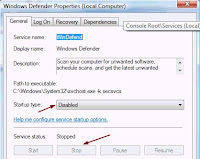
1. Go to Start > Run and type services.msc
2. Look for Windows Defender name and double click to bring up the properties window.
3. Click “Stop” button to stop Windows Defender services and set the Startup type “Disabled

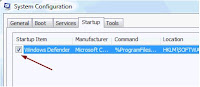
4. Go to Start > Run and type msconfig
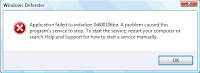
5. Go to Startup tab and uncheck Windows Defender displayed at Startup Item. Important: If you only stop and disable Windows Defender from Services and did not disable Windows Defender at MSCONFIG, you’ll get the error message “Application failed to initialized: 0×800106ba. A problem caused this program’s service to stop. To start the service, restart your computer or search Help and Support for how to start a service manually.The easy way.
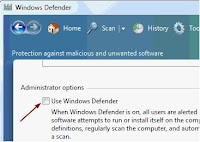
1. Run Windows Defender.
2. Click Tools and go to Options
3. Scroll right to the bottom and you’ll see an option “Use Windows Defender”.
4. Uncheck “Use Windows Defender” and it’ll be disabled.

Disabling Windows Defender in Windows will leave your computer unprotected from spywares (if you don’t have one installed).


Thursday, September 17, 2009

Shape Collage - Free Automatic Photo Collage Maker

Free Automatic Photo Collage Maker
Make picture collages in less than a minute with just a few mouse clicks
Any Shape, Customize it...
DOWNLOAD


Wednesday, September 9, 2009

Outlook Tips: “Unable to open the Outlook window” error

“I receive the following message when trying to open my email:
Cannot start Microsoft Office Outlook. Unable to open the Outlook window.
Could not open folders. No stores were found to be open.”

You need to reset the navigation pane to fix it. To do this, at the Start search field, Start menu, Run or Windows key + R, type:
outlook.exe /resetnavpane

Tuesday, September 1, 2009

Oy! Google Translate now speaks Yiddish

Google Translate


Sent to you by Pradip via Google Reader:


via Webware.com by Josh Lowensohn on 8/31/09

Google on Monday announced that it had added nine new languages to its Translate service.

Included in the update (which actually went live early last week) are Afrikaans, Belarusian, Icelandic, Irish, Macedonian, Malay, Swahili, Welsh, and Yiddish. This brings the total number of languages the service is able to translate to 51.

Like other Google Translate updates, these changes will eventually go out to other services where the machine translation is used, including Google Friend Connect, Google Talk, Gmail, and most recently Google Docs. However, the new languages have not shown up on any of those services just yet.

In late June, Google pushed out an alpha version of Persian translating to meet the needs of increased activity around the Iranian presidential elections. The company continues to note that Persian translations, along with some of these latest additions, will not be as precise as translations to and from some more widely used languages; it will take time to get the quality up to the same level as its Spanish, German, and French translations, which were the first to be offered.

Finally, Google adds a way for people to convert one language into Yiddish.

(Credit: CNET)

Originally posted at Web Crawler


Things you can do from here:


While Installing Windows Vista SP2 error - One or more drivers might be incompatible

MSDSM - Please read Microsoft Knowledge Base 967752
To avoid this problem, install hotfix 967752 before you install Windows Vista/Server 2008 Service Pack 2.
Below is the link to download the hotfix.
http://support.microsoft.com/kb/967752/
else ignore and install

Restore Show Desktop

Restore Show Desktop Icon to Quick Launch on Taskbar
If the Show Desktop icon is deleted from Quick Launch, the procedure below will recreate the file.
Open Notepad and enter the following text:
[Shell]
Command=2
IconFile=explorer.exe,3
[Taskbar]
Command=ToggleDesktop
Save the new file as Show Desktop.scf then drag and drop the icon on the Quick Launch bar or whatever location you want the shortcut to appear.
http://support.microsoft.com/kb/190355

Thursday, August 27, 2009

Online services for viewing documents & images with open it online in your browser

Online services for viewing documents & images with open it online in your Web Browser
Ever find yourself needing to make a last minute change to a document, spreadsheet, presentation, or image but you do not have access to regular software suites? Now you can easily remedy that situation with Open IT Online.
Note: Open IT Online works with the following file types:
Documents (.doc, .docx, .rtf, .odt, .sxw)
Spreadsheets (.xls, .xlsx, .csv, .ods, .sxc)
Presentations (.ppt, .pptx, .pps, .odp, .sxi)
Images (.jpg, .gif, .png)
More Details...

Friday, August 21, 2009

Windows Vista - Code 8000FFFF Windows Update encountered an unknown error


Error when you download updates using Windows Update or Microsoft Update: 8000FFFF

Resolution:
This problem may occur if any of the following values exist in the Windows registry:
HKEY_LOCAL_MACHINE\COMPONENTS\PendingXmlIdentifier
HKEY_LOCAL_MACHINE\COMPONENTS\NextQueueEntryIndex
HKEY_LOCAL_MACHINE\COMPONENTS\AdvancedInstallersNeedResolving
Delete all the three from your registry.
If you don’t know, how to remove it from registry. Please follow the steps mentioned below:
Click Start
In the Start Search box, type regedit.
In the Programs list, click Regedit.exe.
If you are prompted for an administrator password or confirmation, type the password or click Continue.
Find and then click the following registry subkey:
HKEY_LOCAL_MACHINE\COMPONENTS
Right-click COMPONENTS.
Click Export.
In the File Name box, type COMPONENTS.
In the Save in box, click Desktop, and then click Save to save the file to your desktop.
In the details pane, right-click PendingXmlIdentifier, and then click Delete. If this value does not exist, go to the next step.
In the details pane, right-click NextQueueEntryIndex, and then click Delete. If this value does not exist, go to the next step.
In the details pane, right-click AdvancedInstallersNeedResolving, and then click Delete. If this value does not exist, go to the next step.
Restart the computer.

Techies: Todays Headlines